









































A sprint is a fixed period of time from one to four weeks during which a team completes a planned amount of tasks.
Creating a Sprint
On the "Sprints" page, select the project for which the sprint is being created

2. Click the "Create Sprint" button

In the opened form, fill in the fields:
In the opened form, fill in the fields:
Sprint Name
Description (briefly, what the sprint is about)
Start Date and End Date
Click the "Create" button.

The new sprint will appear in the "Current Sprints" list.

Adding Tasks to a Sprint
Go to the service where the project tasks are located (e.g., "Kanban", "Gantt Chart", "Boards").
Find the required task and open it.
In the task editing window, find the "No Sprint" field, select the created sprint from the dropdown list, and save the changes.

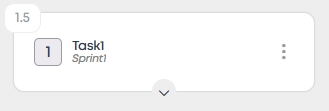
4. The sprint name will be displayed on the task card.
The project author and editor have permission to create sprints. The author can change access permissions for project participants.