









































The Wallet section is designed for balance management: here you can top up your account, view your transaction history, and withdraw funds to bank details.
To make a withdrawal, you must first open the wallet page. There are several ways to do this.
Method 1. Through the top menu on the "Balance" tab
The "Balance" tab is located in the upper panel of the interface, click on the "+" icon next to it, and you will be redirected to the "Wallet" page.
By default, the "Replenishment" tab will open.

Method 2. Through the vertical profile menu
In the side (vertical) menu of the profile, select the "Wallet" option. By default, the "Replenishment" tab will open.
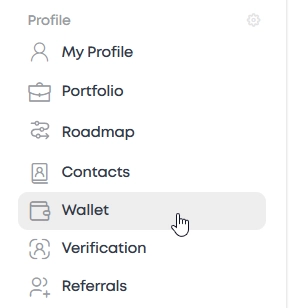
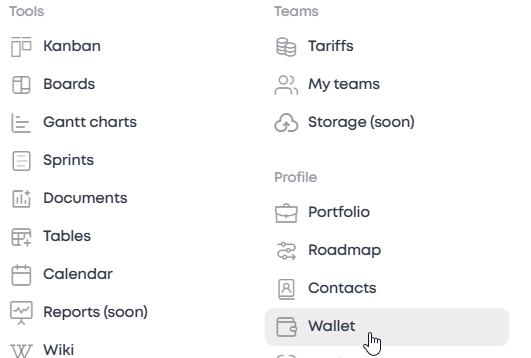
Method 3. Through the "Services" section in the top menu
In the upper horizontal menu, select "Services". In the list of services, click "Wallet".
By default, the "Replenishment" tab will open.
Go to the "Withdrawal of funds" tab.
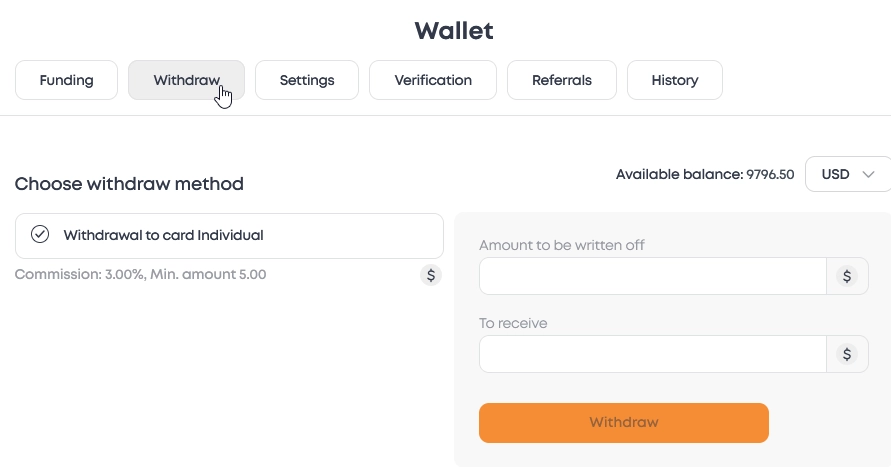
How to issue a withdrawal
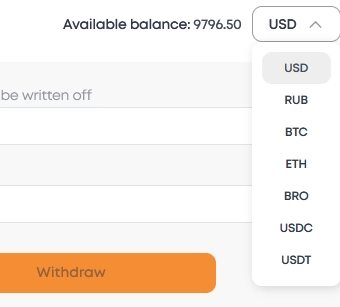
In the "Withdrawal of funds" tab, select the desired currency.
The following currencies are available on ZIO:
- RUB (Russian Rubles)
- USD (US Dollars)
- BTC (Bitcoin)
- ETH (Ethereum)
- BRO (Broccoli Network)
- USDC (Stablecoin)
- USDT (Tezer)
Next, select the withdrawal method according to the selected currency
Next, specify the amount you want to withdraw in the "Amount to debit" field.
The minimum withdrawal amount is equivalent to $5.
Before confirming, check the commission displayed under the form to know the exact amount of the debit.
When everything is ready, click "Withdrawal" and confirm the operation. After that, the request will be processed, and the status can be tracked in the transaction history.
Funds are withdrawn twice a week.:
Monday and Thursday.
Withdrawal requests are formed in the order of the queue, if you make a request on the day when the main payment takes place, then the operation will fall into the next business cycle.
Let's say the application was submitted on Monday, the settlement day, and the funds will be transferred only on the next payment day, Thursday. This should be taken into account when planning personal finances.
We put safety first. Each transaction is subject to mandatory multi-stage manual verification by our financial service. This process takes time, but it is necessary to identify suspicious activity and protect all users of the service. This approach builds our reputation as a reliable platform for transactions between clients and specialists.
Withdrawal fees
The amount of the withdrawal fee depends on the currency and the chosen method
— for dollar cards - 5%, but not less than $2.
For other methods, the commission may vary from 5%, but also at least $2.
Important notes
The minimum amount for ruble transactions is 500 ₽, for dollar transactions — $5.
Before making a withdrawal, make sure that there are enough funds on the balance. The amount should cover both the withdrawal itself and the commission.
Check the banking details before sending to avoid delays.
If the operation doesn't work, try another method or contact our support team. We will help you figure out the problem.